

Using AI With Client Data? Read This Before Your Small Business Takes the Risk
AI compliance for small business is no longer a problem reserved for enterprise legal teams. If your agency, consultancy, clinic, finance firm, law practice, or freelance business uploads client data into AI tools, you are making privacy, security, and contractual decisions whether you have a compliance department or not.
This guide is part of our AI Automation for Small Business series.
The risk is not that every AI tool is unsafe. The risk is that small teams often approve tools in the wrong order: trial first, client data second, compliance questions later. That sequence creates avoidable exposure around GDPR, confidentiality, data residency, retention, intellectual property, and auditability.
AIProToolkit’s operating rule is simple: do not approve an AI tool for client or sensitive data until you can answer four questions in writing:
- What data will enter the tool?
- Where is that data stored and processed?
- Who can access it, and for how long?
- Can we prove what happened if a client, regulator, or auditor asks?
This guide explains GDPR, SOC 2, data residency, audit logging, and vendor review in plain English. It is written for operators who need a usable decision process, not a legal textbook.
Important note: this article is practical guidance, not legal advice. If you handle regulated health data, financial records, children’s data, legal documents, employment records, or high-risk personal data, involve a qualified privacy, security, or legal specialist before deploying AI into live workflows.
Why AI Compliance Is Now a Small Business Issue
Small businesses used to adopt software slowly. AI changed that. A marketer can paste client research into a chatbot in 30 seconds. A consultant can summarize meeting notes with an AI assistant before the contract mentions AI use. A support team can connect customer messages to an AI helpdesk during a trial.
That speed creates a new operating problem: the tool can enter the workflow before the business has defined the rules.
It’s worth defining compliance requirements such as SOC 2, GDPR, and data residency before tool selection, not after. That matters because governance retrofitted later is painful: once client data, internal habits, automations, and subscriptions are already in place, removing or replacing the tool costs more than reviewing it properly at the start.
The clearest number in this decision is budget discipline. The pattern holds here too: a £5,000 tool without governance and training can underperform a £500 tool with strong adoption. In compliance terms, the expensive tool is not automatically the safer tool. The safer tool is the one that matches your data risk, has usable controls, and fits a governed workflow your team will actually follow.
The Core AI Data Risks for Small Businesses
Before comparing AI providers, classify the data you want to use. Most compliance mistakes happen because teams treat all prompts the same. They are not the same.
1. Personal Data
Personal data is information that identifies, or could reasonably identify, a person. Under GDPR, that can include names, email addresses, phone numbers, IP addresses, customer IDs, job titles, meeting transcripts, location data, and combinations of details that point to one individual.
When you put personal data into an AI tool, you need to understand your role, the vendor’s role, the legal basis for processing, where the data goes, and whether the vendor can use it for model training.
2. Client Data
Client data may include campaign performance, financial records, strategy documents, product roadmaps, customer lists, sales calls, contracts, source code, designs, or research. Even if the data is not personal data, it may be covered by confidentiality clauses or professional obligations.
The question is not only “Is this legal?” It is also “Did the client authorize this use?”
3. Confidential Business Data
Internal pricing, hiring plans, merger discussions, product strategy, and vendor negotiations may not fall under privacy law, but exposing them can still harm the business. AI compliance for small business should cover commercial confidentiality, not just regulated personal information.
4. Intellectual Property
AI tools raise two IP questions:
- Are you allowed to upload the source material?
- Who owns or can reuse the output?
For agencies and consultants, this matters when using client copy, brand assets, legal drafts, design briefs, training materials, or proprietary research inside AI systems.
GDPR AI Tools for Small Business: The Plain-English Version
GDPR does not ban small businesses from using AI tools. It requires that personal data be processed lawfully, fairly, transparently, securely, and only for defined purposes. If you use AI with data from people in the UK or EU, GDPR questions need to be answered before the workflow goes live.
The source documents are public: the full text of the GDPR on EUR-Lex, and the UK Information Commissioner’s Office guidance on AI and data protection, which is the more readable starting point.
Is ChatGPT Compliant With GDPR?
The more accurate question is: Can your use of ChatGPT, or any AI tool, be configured and governed in a GDPR-compliant way?
A vendor may provide GDPR-supporting features, but your business still needs to use them correctly. You should check:
- Whether the vendor offers a Data Processing Agreement, often called a DPA.
- Whether personal data is used for model training by default.
- Whether training on your inputs can be disabled.
- Where data is stored and processed.
- Whether international transfer mechanisms are in place, such as Standard Contractual Clauses where applicable.
- How long prompts, files, logs, and outputs are retained.
- Whether admins can manage users, access, retention, and deletion.
For a sole operator using AI to rewrite public website copy, the risk is usually lower. For a clinic summarizing patient notes, a finance consultant analyzing client statements, or a law firm processing case documents, the risk is materially higher.
GDPR Questions to Answer Before Uploading Personal Data
| Question | Why It Matters | Evidence to Request |
|---|---|---|
| What is the legal basis for processing? | You need a lawful reason to process personal data. | Internal privacy review, contract terms, consent records where relevant. |
| Is the AI provider a processor or controller? | This affects contractual and legal responsibilities. | DPA, privacy policy, vendor security documentation. |
| Can the vendor use our data for training? | Client or personal data should not be reused without approval. | Product settings, enterprise terms, written vendor confirmation. |
| Where is the data processed? | Cross-border transfers may require additional safeguards. | Data residency statement, subprocessors list, SCCs where applicable. |
| How can data be deleted? | GDPR rights and client contracts may require deletion. | Retention policy, deletion process, admin controls. |
What SOC 2 Means for AI Providers
SOC 2 is a third-party audit framework used to assess how a service provider manages controls related to security, availability, processing integrity, confidentiality, and privacy. For AI tools, SOC 2 is a useful signal, but it is not a blank check.
When evaluating SOC 2 AI providers, ask which type of report they have:
- SOC 2 Type I: evaluates whether controls are designed appropriately at a point in time.
- SOC 2 Type II: evaluates whether controls operated effectively over a period of time.
For a small business, SOC 2 Type II usually gives stronger assurance than Type I because it shows operational evidence across time, not just a snapshot.
What SOC 2 Does Not Prove
SOC 2 does not automatically prove that:
- The tool is GDPR-compliant for your specific use case.
- You are allowed to upload client data under your contract.
- The AI output is accurate.
- Your team is using the tool safely.
- The vendor’s retention settings match your requirements.
Use SOC 2 as one evidence point in the vendor review, not as the whole decision.
Data Residency, Data Retention, and AI Audit Logging
Three controls matter more than most small teams realize: data residency, data retention, and audit logging. These are not abstract compliance terms. They determine whether you can answer a client or regulator when something goes wrong.
Data Residency AI Tools: What to Check
Data residency means where your data is stored or processed. Some tools let you choose a region, such as the EU or US. Others do not. Some store files in one region but process them through subprocessors elsewhere.
Ask vendors:
- Where are prompts stored?
- Where are uploaded files stored?
- Where is inference or processing performed?
- Can we choose a storage region?
- Which subprocessors can access or process the data?
- Will we be notified if subprocessors change?
Data Retention
Data retention is how long the vendor keeps prompts, outputs, files, logs, embeddings, transcripts, or derived data. The safest workflow is not always the tool with the most features. It is often the tool with the shortest necessary retention and the clearest deletion controls.
For client-sensitive work, avoid tools where you cannot determine whether uploaded information is stored, reused, or deleted.
AI Audit Logging
AI audit logging records who used the tool, when they used it, what data was accessed, and what actions were taken. Audit logs matter when a client asks, “Who uploaded this document?” or when an internal incident requires investigation.
At minimum, business-grade AI tools should let an admin review:
- User login and access history.
- File upload activity.
- Prompt or conversation metadata where appropriate.
- Integration activity.
- Permission changes.
- Export or deletion events.
If a tool cannot show who did what, it may still be acceptable for low-risk public content tasks. It is harder to justify for client files, regulated workflows, or confidential records.
Before You Subscribe: The AI Vendor Review Checklist
It’s standard advice to conduct an internal audit to identify specific pain points before signing up for trials. That advice is especially important for AI compliance because the data risk depends on the workflow, not the logo on the tool.
Before approving any AI tool, document the workflow in one page:
- Use case: What job will the AI tool perform?
- Data type: Public, internal, client confidential, personal, regulated, or special category.
- Users: Who will have access?
- Inputs: What will be uploaded, pasted, synced, or imported?
- Outputs: What will be generated, stored, shared, or sent to clients?
- Integrations: Which apps will connect to the AI tool?
- Review step: Who approves outputs before use?
- Retention: How long does the vendor keep the data?
- Client permission: Does the contract allow this workflow?
- Fallback: What happens if the tool is removed?
Most vendors publish the answers to these questions. Anthropic, for example, has a privacy center, a trust center, and a data processing addendum. OpenAI publishes its enterprise privacy commitments and a data processing addendum. Read the pages for the exact plan you use, because consumer and business plans often handle data differently.
Vendor Questions to Ask in Writing
| Category | Question | Green Signal | Red Flag |
|---|---|---|---|
| GDPR | Do you offer a DPA? | Clear DPA available for business customers. | No DPA or vague privacy language. |
| Model Training | Will our prompts, files, or outputs train your models? | Training disabled by default or contractually excluded. | Inputs may be used for training without clear opt-out. |
| SOC 2 | Do you have SOC 2 Type II or equivalent security assurance? | Current report or security package available under NDA. | No independent security documentation. |
| Data Residency | Where is our data stored and processed? | Region options and subprocessor list are documented. | Vendor cannot clearly answer. |
| Retention | How long do you keep prompts, files, logs, and outputs? | Retention periods are specific and configurable. | Retention is indefinite or unclear. |
| Audit Logging | Can admins see user and data activity? | Admin logs support review and investigation. | No usable audit trail. |
| Access Control | Can we manage permissions by role? | SSO, role-based access, user offboarding controls. | Shared logins or weak user management. |
| Deletion | Can we delete data on request? | Documented deletion workflow and timelines. | No clear deletion mechanism. |
Red, Yellow, and Green-Light AI Use Cases
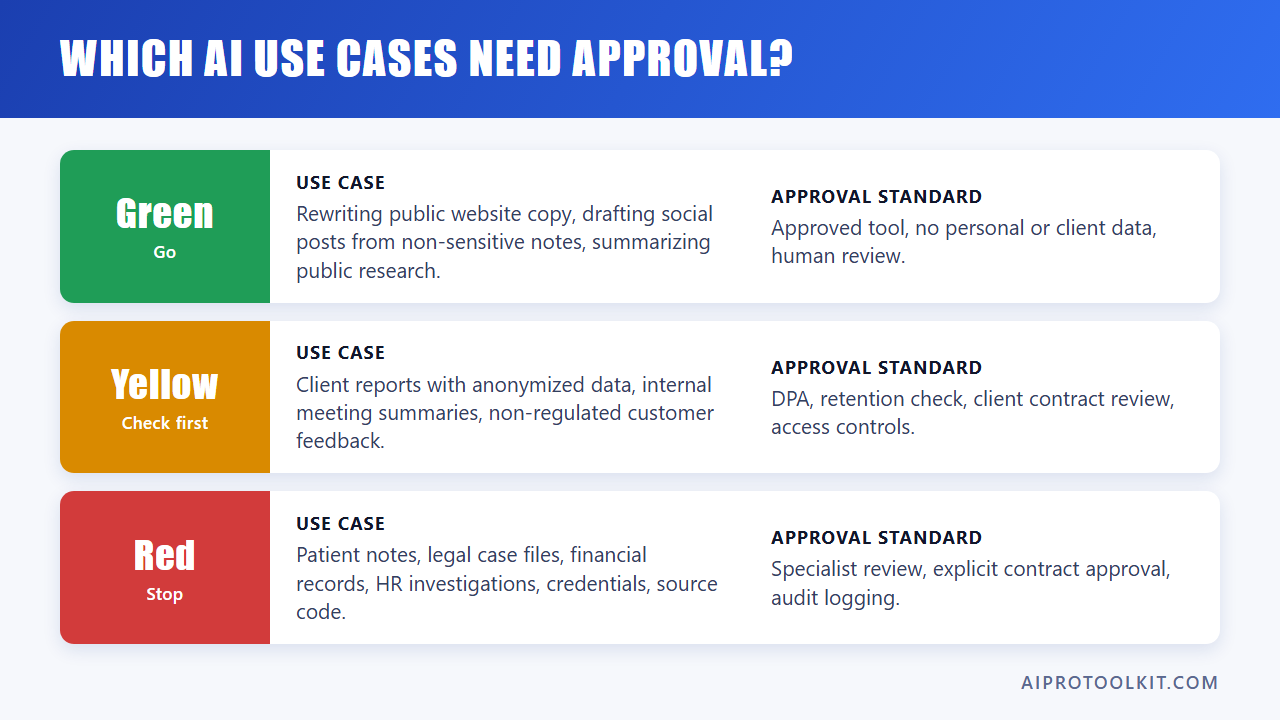
Not every AI use case needs the same review. Community discussions among small business users often point to the same practical advice: start with safer, smaller AI use cases, then expand only when the value and risk controls are clear.
| Risk Level | Use Case | Typical Approval Standard |
|---|---|---|
| Green | Rewriting public website copy, drafting social posts from non-sensitive notes, summarizing public research. | Approved tool list, no personal or client-confidential data, human review. |
| Yellow | Drafting client reports with anonymized data, summarizing internal meetings, analyzing non-regulated customer feedback. | DPA, retention check, client contract review, access controls. |
| Red | Uploading patient notes, legal case files, financial records, HR investigations, credentials, source code, or sensitive client strategy. | Specialist review, explicit contract approval, security assessment, audit logging, strict access controls. |
The rule is boring but effective: keep public data in standard AI workflows, and require written approval before personal, regulated, or client-confidential data enters any AI system.
Examples by Small Business Workflow
Agency Client Content
An agency wants to use AI to generate first drafts of blog posts and ad copy. If the inputs are public product pages, published brand guidelines, and non-confidential campaign notes, the workflow may be low to moderate risk. If the inputs include unreleased product plans, customer lists, or private performance data, the risk rises.
Practical control: create a client AI clause that states whether AI tools may be used, what data can be processed, and whether human review is required before delivery.
Finance Workflows
A finance consultant wants to upload bank statements, tax documents, or investment records for summarization. This is not a casual AI workflow. The documents likely contain personal data, account information, and confidential financial details.
Practical control: use only approved vendors with a DPA, strong access controls, defined data residency, retention limits, and audit logging. Involve a compliance specialist if regulated obligations apply.
Healthcare Notes
A clinic wants to summarize patient consultations. Healthcare data can trigger strict legal and contractual obligations, depending on jurisdiction. General-purpose AI tools may not be appropriate unless the vendor, contract, configuration, and workflow meet the applicable standard.
Practical control: do not upload identifiable patient information to an unapproved AI tool. Require specialist review before live use.
Legal Documents
A law firm or legal consultant wants to analyze contracts, witness statements, or case files. The concern is not only privacy. It includes privilege, confidentiality, professional duties, accuracy, and recordkeeping.
Practical control: require matter-level approval, vendor due diligence, human review, and a documented audit trail for any AI-assisted legal workflow.
Governance, Training, and Approved Tool Lists Reduce Risk
Automation only pays off when it’s connected to broader workflow consistency, not treated as a one-off fix. That applies directly to AI compliance. The tool choice matters, but the operating system around the tool matters just as much.
A basic AI governance policy for a small business does not need to be 40 pages. It should answer:
- Which AI tools are approved?
- Which data types are prohibited?
- Who can approve a new tool?
- When is client permission required?
- Which workflows require human review?
- How are incidents reported?
- How often is the approved list reviewed?
Simple AI Governance Policy Template
Use this lightweight structure as a starting point for an internal AI governance policy template:
- Purpose: Define how the business uses AI safely and responsibly.
- Approved Tools: List tools approved for public, internal, client, and regulated data.
- Prohibited Uses: Ban uploads of passwords, payment data, health data, legal files, HR records, or client-confidential data unless specifically approved.
- Vendor Review: Require GDPR, SOC 2, data residency, retention, and audit logging checks before approval.
- Human Review: Require a qualified person to review AI outputs before client delivery or operational use.
- Client Disclosure: Define when clients must be informed or give permission.
- Access Control: Require named users, no shared logins, and prompt offboarding.
- Incident Process: Define how suspected data exposure is reported and investigated.
- Review Cycle: Reassess approved tools and policies at a defined interval.
This is where many teams get the budget decision wrong. They compare subscription prices but do not price the unmanaged workflow. A £500 tool with a clear policy, trained users, and an approved use case can be safer and more valuable than a £5,000 platform that nobody governs properly.
When to Seek Specialist Compliance Help
Small businesses do not need a lawyer for every public-content AI prompt. But there are clear points where specialist advice is cheaper than guessing.
Get qualified help before using AI with:
- Health or patient data.
- Financial records or regulated investment data.
- Legal case files or privileged communications.
- Children’s data.
- Biometric or identity verification data.
- HR investigations, disciplinary records, or employee health information.
- Large-scale customer profiling or automated decision-making.
- Client data where the contract does not mention AI use.
- Cross-border processing where data residency is contractually restricted.
The operating test is simple: if you would not email the data to an unknown subcontractor, do not paste it into an AI tool until the vendor and contract have been reviewed.
FAQ: AI Compliance for Small Business
Is ChatGPT compliant with GDPR?
ChatGPT or any AI tool is not “compliant” in isolation for every business use case. Your configuration, contract, data type, legal basis, retention settings, and internal controls determine whether your use can meet GDPR requirements. For personal or client-sensitive data, review the DPA, training settings, data residency, retention, and deletion process before use.
What is SOC 2 for AI tools?
SOC 2 is an independent audit framework that evaluates a service provider’s controls for areas such as security, availability, confidentiality, processing integrity, and privacy. For AI tools, SOC 2 Type II is a stronger signal than Type I because it reviews whether controls operated effectively over time.
Can I use AI for client data without a contract?
You should be careful. Even if privacy law allows a specific workflow, your client contract may restrict subcontracting, data sharing, confidentiality, or use of external processors. If the data is confidential, personal, regulated, or commercially sensitive, get written approval or contract coverage before using AI.
What is data residency and why does it matter?
Data residency refers to where data is stored or processed. It matters because laws, contracts, and client requirements may restrict whether data can leave a region. Some AI tools allow regional storage; others process data through global infrastructure or subprocessors. Always verify the vendor’s actual policy.
What should I ask an AI vendor before subscribing?
Ask whether they offer a DPA, whether your data is used for model training, whether they have SOC 2 Type II or equivalent assurance, where data is stored and processed, how long data is retained, whether audit logs are available, how deletion works, and which subprocessors are involved.
Do small businesses need an AI governance policy?
Yes, if more than one person uses AI or if any client, personal, or confidential data is involved. The policy can be short. It should list approved tools, prohibited data, review requirements, client disclosure rules, and the process for approving new tools.
Is anonymizing data enough?
Sometimes, but not always. True anonymization is harder than removing names. Job titles, locations, transaction details, dates, and context can still identify a person or client. For sensitive workflows, treat anonymization as a risk reduction step, not a complete compliance answer.
Building AI Compliance Small Business Teams Can Sustain, Not Just Pass Once
A one-time review is not the same as ongoing AI compliance. Small business teams that treat GDPR and SOC 2 checks as a single gate before signing up for a tool often find the controls quietly decay: new staff get shared logins, a new integration gets connected without a fresh vendor check, or a client project starts using a tool that was only approved for internal drafts. Revisit your approved tool list and data classifications on a fixed schedule, not only when a new vendor shows up.
If your business is still deciding which processes to hand to AI in the first place, it is worth pairing this compliance review with AIProToolkit’s guide on what to automate first, since the workflows you choose to automate largely determine how much regulated or client data ends up flowing through AI tools in the first place.
Conclusion: Approve the Workflow, Not Just the Tool
AI compliance for small business is not about blocking AI adoption. It is about stopping unmanaged data movement before it becomes a client, legal, or operational problem.
The practical sequence is:
- Define the workflow.
- Classify the data.
- Check GDPR, SOC 2, data residency, retention, and audit logging.
- Confirm client and contractual permission.
- Approve the tool only for the specific use case.
- Train the team on what must never be uploaded.
The measurable operating decision is not “Should we use AI?” It is “Which AI workflows are safe enough, valuable enough, and governed enough to keep?” A lower-cost tool with clear rules can outperform a higher-cost tool used carelessly. That is the compliance lesson hidden inside the £5,000 versus £500 comparison: governance changes the value of the tool.
Next step: pair this review with our AI governance policy template, and use the questions above to review GDPR, SOC 2, data residency, retention, and AI audit logging before approving a new AI tool for client or sensitive data.